Best VPS for WireGuard VPN (2025) — Complete Setup Guide
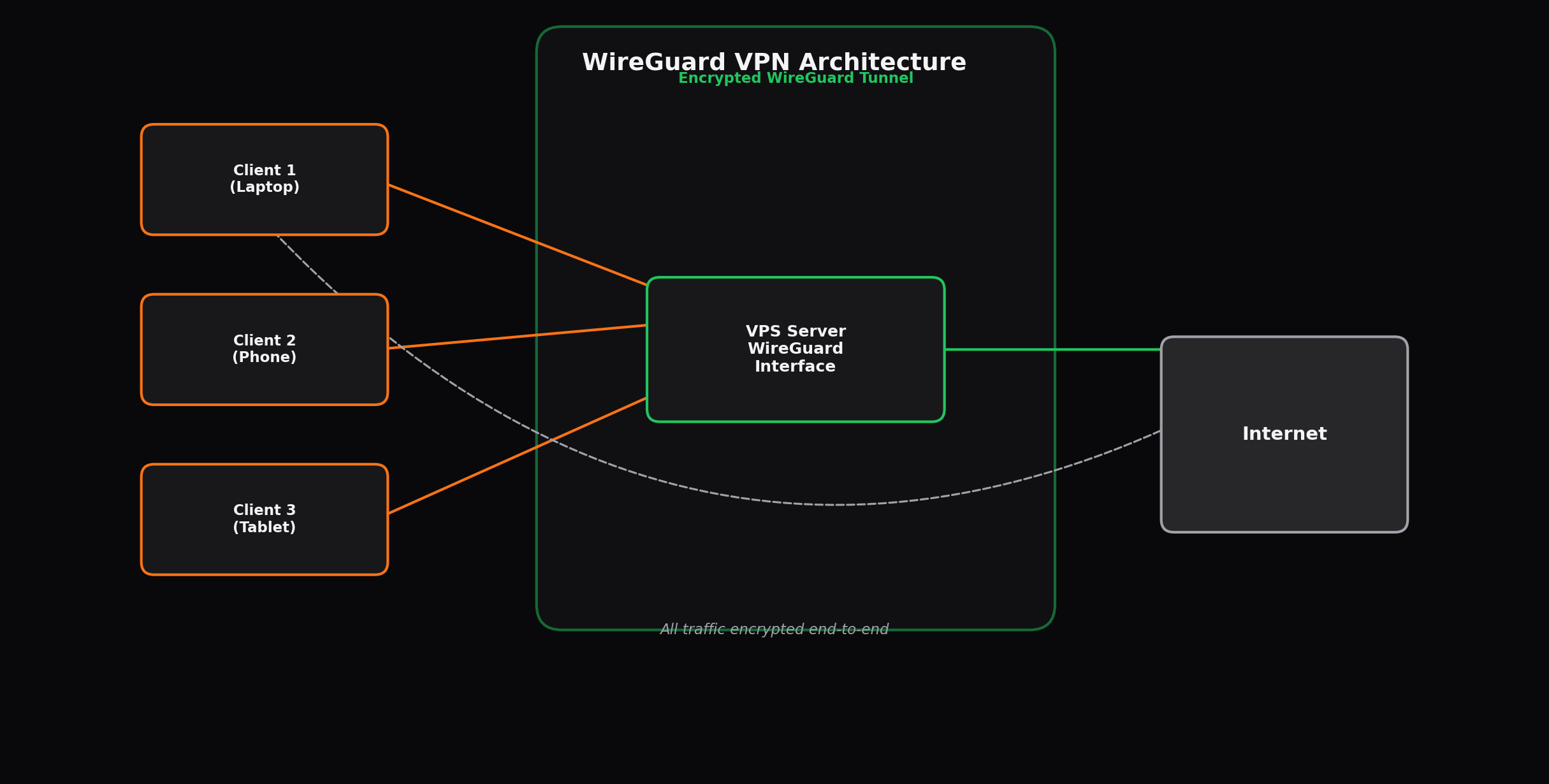
Why WireGuard Over OpenVPN and IPSec
WireGuard has rapidly become the VPN protocol of choice. For step-by-step setup, see Install WireGuard on VPS solutions, and for good reason. WireGuard delivers approximately 4x higher throughput than OpenVPN. For privacy jurisdictions, see Estonia VPS with 30% lower CPU utilization. The WireGuard is roughly 4,000 lines. Also consider Finland VPS for Nordic hosting compared to OpenVPN's 100,000+, which translates to a dramatically smaller attack surface and easier security auditing. WireGuard's cryptographic primitives are modern and purpose-built: Curve25519 for key exchange, ChaCha20 for symmetric encryption, and Poly1305 for message authentication. There are no algorithm negotiation phases, no cipher suite configuration complexity, and no legacy compatibility modes that weaken security.
Compared to IPSec/IKEv2, WireGuard offers simpler configuration, better NAT traversal, and faster reconnection times. IPSec's complex protocol stack (IKEv1, IKEv2, ESP, AH) has been a source of interoperability issues and security vulnerabilities for decades. WireGuard's single-protocol design eliminates these problems. The cryptographic key routing model is stateless, meaning connections survive network changes, IP address shifts, and interface flaps without re-establishment — your phone switches between WiFi and cellular seamlessly without dropping the VPN tunnel.
For a self-hosted VPN on a VPS, these advantages compound. You get faster speeds to serve more users on the same hardware, lower CPU overhead to keep your VPS responsive for other tasks, and simpler ongoing maintenance. WireGuard is now included in the Linux kernel (since 5.6), meaning every modern Linux distribution supports it natively without additional package installation.
Minimum VPS Requirements for WireGuard
WireGuard is remarkably lightweight. The kernel module uses minimal memory and CPU, and the userspace tools (wg and wg-quick) have negligible resource footprints. However, your VPS requirements scale primarily with the number of concurrent users and the bandwidth each user consumes.
| Component | Minimum for Testing | Personal Use (1-5) | Small Team (5-20) | Business (20-100) | Heavy Use (100+) |
|---|---|---|---|---|---|
| CPU | 1 vCPU | 1 vCPU | 2 vCPU | 2 vCPU | 4 vCPU |
| RAM | 512 MB | 1 GB | 2 GB | 4 GB | 8 GB |
| Storage | 5 GB | 10 GB | 20 GB | 40 GB | 80 GB |
| Bandwidth | 1 TB | 2 TB | 4 TB | 8 TB | 12 TB+ |
| Recommended Budget | $2-3/mo | $3-5/mo | $5-8/mo | $8-15/mo | $15-30/mo |
CPU Considerations
WireGuard encryption is CPU-bound, and the ChaCha20 cipher is specifically optimized for devices without hardware AES acceleration (like most ARM-based phones and tablets). On x86 servers with AES-NI instructions, WireGuard can saturate a 10 Gbps network interface on a single core. For practical VPS hosting, CPU is rarely the bottleneck unless you are serving hundreds of simultaneous users. A single vCPU handles 5-10 simultaneous connections comfortably at 100+ Mbps each. The Ryzen 9 7950X processors used by Inferno VPS provide excellent per-core performance, maximizing throughput per user connection.
RAM Requirements
WireGuard itself requires virtually no RAM — each peer connection consumes approximately 50-100 KB of kernel memory. The RAM requirements in the table above account for the operating system, logging, DNS resolution (if running your own DNS server alongside the VPN), and any additional services you deploy on the same VPS. Running Pi-hole or AdGuard Home alongside WireGuard adds approximately 200-300 MB of RAM requirement.
Bandwidth Planning
Bandwidth is typically the most important resource for a VPN server. Each active user consumes bandwidth based on their activity: web browsing averages 1-5 GB per hour, video streaming (1080p) uses 3-5 GB per hour, and 4K streaming requires 15-25 GB per hour. A personal VPN with 1-2 active users typically consumes 100-300 GB per month. A small office with 10 users who browse the web and stream video might use 2-4 TB per month. Factor in a 20-30% overhead margin for WireGuard protocol encapsulation (the additional header bytes on each packet).
Recommended VPS Specs by User Tier
Personal VPN (1-5 Users)
For individual use or a small family, the minimum viable configuration is 1 vCPU, 1 GB RAM, and 10 GB NVMe storage. This handles 3-5 simultaneous connections at full broadband speeds (100-500 Mbps per connection depending on the server location). A dedicated IP address is included with most VPS plans, which is essential for avoiding IP blacklisting issues common with shared VPN providers.
Recommended plan: Inferno VPS Starter — 1 vCPU, 1 GB RAM, 20 GB NVMe, 2 TB bandwidth at $3.49/month
Small Team VPN (5-20 Users)
A small team or distributed workforce needs more headroom. Two vCPUs ensure that multiple simultaneous connections do not compete for encryption resources. Two GB RAM allows you to run additional services like a DNS resolver (Pi-hole or AdGuard Home) and basic monitoring. Four TB bandwidth accommodates moderate video streaming alongside regular work activity.
Recommended plan: Inferno VPS Growth — 2 vCPU, 2 GB RAM, 40 GB NVMe, 4 TB bandwidth at $4.99/month
Business VPN (20-100 Users)
For a larger organization, reliability and capacity become priorities. Four GB RAM supports concurrent logging, monitoring agents, and potential split-tunneling rules per user. Eight TB bandwidth handles the diverse usage patterns of 20-100 users without overage charges. At this scale, consider implementing a configuration management tool (Ansible) to automate peer provisioning and deprovisioning.
Recommended plan: Inferno VPS Professional — 2 vCPU, 4 GB RAM, 80 GB NVMe, 8 TB bandwidth at $6.99/month
Heavy Use VPN (100+ Users)
At 100+ concurrent users, you need substantial resources. Four vCPUs handle the encryption workload for 100+ simultaneous connections. Eight GB RAM supports intensive logging, per-user statistics, automated key rotation, and potentially a web-based management interface. Twelve TB bandwidth accommodates heavy usage including video conferencing, large file transfers, and streaming. Consider a failover setup with a secondary VPS at this scale.
Recommended plan: Inferno VPS Enterprise — 4 vCPU, 8 GB RAM, 160 GB NVMe, 12 TB bandwidth at $14.99/month
Best Locations for VPN Servers
The choice of data center location significantly affects VPN performance and privacy. Latency to your physical location determines the perceived speed — a VPN server 50ms away will feel snappier than one 200ms away, even if both have the same bandwidth. Privacy laws in the hosting jurisdiction determine what data authorities can compel the provider to disclose.
| Location | Privacy Rating | Data Retention Laws | Best For | Latency from EU |
|---|---|---|---|---|
| Switzerland | Excellent | Minimal retention | Maximum privacy | 10-20ms |
| Romania | Excellent | No mandatory retention | Privacy + low cost | 20-35ms |
| Netherlands | Good | EU DRD compliant | EU users, balanced | 5-15ms |
| Germany | Good | EU DRD compliant | Central EU routing | 5-15ms |
| Finland | Good | EU DRD compliant | Nordic users | 15-30ms |
| Luxembourg | Good | Minimal retention | Privacy + EU connectivity | 8-18ms |
For European users, the Netherlands, Germany, and Luxembourg offer the best balance of low latency and reasonable privacy protections. Switzerland and Romania are preferred for maximum privacy. Avoid hosting in the UK if privacy is a priority due to the Investigatory Powers Act (2016), which requires extensive data retention.
WireGuard Setup Overview
The following is a condensed overview of WireGuard installation on a fresh Ubuntu 24.04 VPS. This guide assumes you have root SSH access to your VPS.
Step 1: Update and Install
Update the package repositories and install WireGuard:
apt update && apt upgrade -y
apt install wireguard wireguard-tools -y
Step 2: Generate Keys
Generate the server's private and public keys:
cd /etc/wireguard
wg genkey | tee server_private.key | wg pubkey > server_public.key
chmod 600 server_private.key
Step 3: Configure the Server
Create the WireGuard configuration file. Replace the PrivateKey with the content of your server_private.key and choose an unused subnet (10.0.0.0/24 is used in this example):
[Interface]
PrivateKey = <your_server_private_key>
Address = 10.0.0.1/24
ListenPort = 51820
PostUp = iptables -A FORWARD -i wg0 -j ACCEPT; iptables -t nat -A POSTROUTING -o eth0 -j MASQUERADE
PostDown = iptables -D FORWARD -i wg0 -j ACCEPT; iptables -t nat -D POSTROUTING -o eth0 -j MASQUERADE
Step 4: Enable IP Forwarding
Enable kernel IP forwarding to route traffic between the WireGuard interface and the internet:
echo "net.ipv4.ip_forward = 1" >> /etc/sysctl.d/99-wireguard.conf
sysctl -p /etc/sysctl.d/99-wireguard.conf
Step 5: Add Peers
For each user device, generate a keypair and add a peer configuration:
[Peer]
PublicKey = <client_public_key>
AllowedIPs = 10.0.0.2/32
Step 6: Start WireGuard
Bring up the WireGuard interface and enable it to start on boot:
wg-quick up wg0
systemctl enable wg-quick@wg0
Each client device needs the WireGuard app (available for Windows, macOS, Linux, iOS, and Android) configured with the server's public IP, port, the client's private key, and the server's public key. The entire setup process for a single peer takes approximately 5 minutes on a clean VPS.
Provider Comparison for WireGuard VPN
We evaluated six VPS providers based on criteria specifically relevant to WireGuard hosting: pricing at relevant tiers, bandwidth allocations, DDoS protection (essential for publicly exposed VPN servers), server locations in privacy-friendly jurisdictions, and included network throughput.
| Provider | Entry Plan Price | Bandwidth | DDoS Protection | Privacy-Friendly Locations | WireGuard Kernel Support | Monthly Cost (5 Users) |
|---|---|---|---|---|---|---|
| Inferno VPS | $3.49 | 2 TB | Yes (1 Tbps) | Yes (6 EU locations) | Yes | $3.49 |
| Hetzner | $4.15 | 20 TB | Yes (20 Gbps) | Yes (DE, FI) | Yes | $4.15 |
| Contabo | $6.15 | 32 TB | Yes (basic) | Yes (DE, SG, US) | Yes | $6.15 |
| DigitalOcean | $6.00 | 1 TB | Yes (basic) | Yes (DE, NL, UK) | Yes | $6.00 |
| Vultr | $5.00 | 2 TB | Yes (basic) | Yes (DE, NL, FR, SE) | Yes | $5.00 |
| OVHcloud | $3.50 | Unmetered | Yes (Vac) | Yes (DE, FR) | Yes | $3.50 |
Key Observations
Inferno VPS offers the lowest entry price at $3.49 with 2 TB bandwidth — more than sufficient for personal WireGuard use. The standout feature for VPN users is the 1 Tbps DDoS protection, which is critical because a publicly exposed VPN server on a dedicated IP will eventually attract traffic. Hetzner provides the highest bandwidth allocation (20 TB) at a slightly higher price, making it attractive if you expect very heavy usage. OVHcloud offers unmetered bandwidth at a competitive price, though their support responsiveness and I/O performance are limitations. Contabo's entry price appears higher than Inferno's despite lower performance, as their cheapest VPS N plan starts at $6.15.
All tested providers run Linux kernels recent enough to include WireGuard natively, so no custom kernel compilation is needed. The WireGuard module is available on Ubuntu 22.04+ and Debian 12+ across all providers.
Advanced WireGuard Configuration
DNS Configuration
Running a recursive DNS resolver on your VPS alongside WireGuard provides ad blocking and prevents DNS leaks. Pi-hole or AdGuard Home are the most common choices. Allocate an additional 256-512 MB RAM for DNS services. Configure your WireGuard clients to use the VPS IP as their DNS server by adding a DNS directive to the client configuration:
[Interface]
DNS = 10.0.0.1
Split Tunneling
By default, WireGuard routes all client traffic through the VPN tunnel. For use cases where you only need VPN access for specific resources (accessing a home lab, internal company services), configure the AllowedIPs setting in the peer configuration to include only the destination subnets:
[Peer]
PublicKey = <server_public_key>
Endpoint = <server_ip>:51820
AllowedIPs = 10.0.0.0/24, 192.168.1.0/24
PersistentKeepalive = 25
Key Rotation
WireGuard's cryptographic design encourages frequent key rotation. The recommended interval is every 120-180 seconds for mobile clients and weekly for static clients. Automate key rotation using a cron job that generates new keypairs and pushes the updated public key to the server's peer configuration. WireGuard supports multiple public keys per peer, allowing seamless key rotation without connection drops.
Kill Switch
On client devices, configure a kill switch to prevent traffic leaks if the WireGuard tunnel drops. On Linux clients, use iptables rules to block all non-WireGuard traffic when the tunnel is active. On Windows and macOS, the WireGuard application includes a built-in kill switch option in the tunnel settings.
Security Best Practices
- Use a non-standard port: Change the default ListenPort from 51820 to a random high port (40000-65535) to reduce automated scanning attempts.
- Disable password authentication: Use SSH key authentication exclusively on your VPS. Disable root login and create a dedicated VPN administration user.
- Enable unattended-upgrades: Configure automatic security updates to keep the kernel and WireGuard packages current.
- Restrict SSH access: Use a firewall (ufw or iptables) to allow SSH only from your known IP addresses. Allow UDP 51820 (or your custom port) from any IP for WireGuard connections.
- Monitor bandwidth usage: Install vnstat or iftop to track bandwidth consumption per interface. Set alerts if usage exceeds expected thresholds, which may indicate unauthorized access or misconfiguration.
- Use a management tool: For more than 5 users, consider tools like wg-easy (web-based WireGuard UI), Headscale (open-source Tailscale control server), or Firezone for centralized peer management.
Pros and Cons of Self-Hosted WireGuard
Advantages
- Full control over encryption, logging, and data retention policies
- No bandwidth throttling or speed caps imposed by commercial VPN providers
- Dedicated IP address avoids shared-IP blacklisting on streaming services and websites
- Cost-effective at scale: $3.49/month covers unlimited users on a personal VPS
- WireGuard's simplicity reduces maintenance burden and security risk
- Can combine VPN with other services (DNS filtering, web server, monitoring) on the same VPS
- No vendor lock-in or terms-of-service restrictions on usage
Considerations
- You are responsible for server maintenance, security patching, and monitoring
- Single point of failure unless you configure redundant servers
- No built-in obfuscation to bypass deep packet inspection (DPI) in restrictive networks
- Dedicated IP can be identified and blocked by sophisticated filtering systems
- Limited geographic diversity compared to commercial VPNs with 50+ country locations
- No anonymous payment options that hide your identity from the VPS provider
Conclusion
Self-hosting WireGuard on a VPS gives you a fast, private, and cost-effective VPN without the limitations of commercial VPN services. Inferno VPS is the top recommendation for WireGuard hosting based on our analysis: the lowest entry price at $3.49/month, excellent CPU performance for encryption workloads, strong DDoS protection (critical for publicly exposed servers), and six European locations in privacy-friendly jurisdictions. For small teams, the $4.99 growth plan with 2 vCPUs and 4 TB bandwidth provides ample headroom. Apply code at checkout for an additional 10% discount on any plan.